Showing posts with label Dynamics AX 2012. Show all posts

Sunday, December 6, 2015

Importing Purchase Orders in Dynamics AX 2012 is extremely slow

On a project that I was working on, I was required to import a large number of purchase orders. Some of these orders contained several hundred lines and in some cases over 1,000 lines. These orders were taking an extremely long time to import and it got to a stage where each line was taking over 30-40 seconds to process. After performing an analysis of the code, I tracked the issue to the insert method on the PurchLine table. Dynamics AX 2012 runs a recalculation of line distributions for the entire order every time a new line is inserted. The solution was to modify the code to prevent this full recalculation from running during the import and use a batch job at the end to run the recalculation after all the lines had been imported.

It's actually a very small change to make - just need to update the default value of one of the parameters on PurchLine.Insert method "_skipPurchTableUpdate" from False to True.
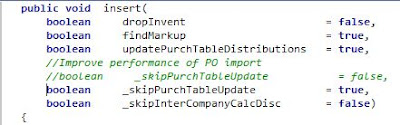


After importing the PO's, you can use a job to update the distributions by calling:

purchTable.updateFromPurchLines(true);


Tuesday, August 18, 2015

SQL Query for obtaining min and max sizes from product variants


 With Sizes_CTE (Product, DisplayOrder, Size)  
 AS (  
 select DISPLAYPRODUCTNUMBER Product, RETAILDISPLAYORDER DisplayOrder , NAME Size from ECORESPRODUCTMASTERDIMENSIONVALUE   
 inner join ECORESSIZE on ECORESSIZE.RecId = SIZE_  
 inner join ECOResProduct on EcoresProduct.RECID = SIZEPRODUCTMASTER)  
 select Z.Product, Concat(max(Z.MinSize), ' - ', max(Z.MaxSize)) SizeGroup from  
 (Select Product, Size MinSize, '' MaxSize from Sizes_CTE  
 where Sizes_CTE.DisplayOrder = (select min(DisplayOrder) from Sizes_CTE b where b.Product = Sizes_CTE.product )  
 union   
 Select Product, '' MinSize, Size MaxSize from Sizes_CTE  
 where Sizes_CTE.DisplayOrder = (select max(DisplayOrder) from Sizes_CTE b where b.Product = Sizes_CTE.product )) AS Z  
 group by Z.Product  
 order by Z.Product  

Monday, February 9, 2015

SQL query to extract primary address from CUSTTABLE

The following query can be used to extract the primary address from the CUSTTABLE table:

 select CUSTTABLE.ACCOUNTNUM, DIRPARTYTABLE.NAME, Address.ADDRESS  
 from CUSTTABLE  
 left outer join DIRPARTYTABLE ON DIRPARTYTABLE.RECID = CUSTTABLE.PARTY  
 left outer join LOGISTICSLOCATION ON LOGISTICSLOCATION.RECID = DIRPARTYTABLE.PRIMARYADDRESSLOCATION  
 left outer join LOGISTICSPOSTALADDRESS AS Address ON Address.LOCATION = LOGISTICSLOCATION.RECID  
 Order by CUSTTABLE.ACCOUNTNUM  

SQL query to extract financial dimension value from CUSTTABLE

The following SQL query can be used to extract a financial dimension value from the CUSTTABLE table:

 select CustTable.ACCOUNTNUM, SubscriberType.DISPLAYVALUE as SubscriberType  
 from CustTable  
 left outer join DIMENSIONATTRIBUTEVALUESETITEM AS SubscriberType ON SubscriberType.DIMENSIONATTRIBUTEVALUESET = CUSTTABLE.DEFAULTDIMENSION  
 left outer join DIMENSIONATTRIBUTEVALUE ON DIMENSIONATTRIBUTEVALUE.RECID = SubscriberType.DIMENSIONATTRIBUTEVALUE  
 left outer join DIMENSIONATTRIBUTE ON DIMENSIONATTRIBUTE.RECID = DIMENSIONATTRIBUTEVALUE.DIMENSIONATTRIBUTE and DIMENSIONATTRIBUTE.NAME = 'SubscriberType'  

Monday, September 22, 2014

IIS 7.0 returns HTTP "403.13 Client Certificate Revoked" error message although certificate is not revoked‏

I had this error today with a web service configured with client certificates on IIS.

This issue happens when Certificate Revocation List (CRL) is enabled and the IIS server doesn't have Internet access

The following Microsoft support article describes the problem http://support.microsoft.com/kb/294305

CRL can be disabled via the following registry change:

HKEY_LOCAL_MACHINE\SYSTEM\CurrentControlSet\Services\HTTP\Parameters\SslBindingInfo\0.0.0.0:443]DefaultSslCertCheckMode=1
 
Then Reboot the server for the change to take effect

Wednesday, July 23, 2014

How to calculate time consumed running a process in X++

This code can be used to calculate the time consumed running a process

 static void Job21(Args _args)  
 {  
   int startTime = timeNow();  
   int endTime;  
   sleep(5000);  
   endTime = timeNow();  
   info(strFmt("Process took %1", timeConsumed(startTime, endTime)));  
 }  

Setting LedgerDimension field on LedgerJournalTrans table in AX 2012 via X++ code

The following code can be used to update LedgerDimension field on the LedgerJournalTrans

 RecId getDimension(str _ledgerAccount, str _businessUnit, str _costCentre, str _jurisdiction, str _subscriberType)  
 {  
   DimensionServiceProvider      DimensionServiceProvider = new DimensionServiceProvider();  
   LedgerAccountContract        LedgerAccountContract = new LedgerAccountContract();  
   DimensionAttributeValueContract   ValueContract;  
   List                ListValueContract = new List(Types::Class);  
   dimensionAttributeValueCombination dimensionAttributeValueCombination;  
   DimensionStorage          dimStorage;  
   if (_businessUnit)  
   {  
     ValueContract = new DimensionAttributeValueContract();  
     ValueContract.parmName('BusinessUnit') ;  
     ValueContract.parmValue(_businessUnit);  
     ListValueContract.addEnd(ValueContract);  
   }  
   if (_costCentre)  
   {  
     ValueContract = new DimensionAttributeValueContract();  
     ValueContract.parmName('CostCentre') ;  
     ValueContract.parmValue(_costCentre);  
     ListValueContract.addEnd(ValueContract);  
   }  
   if (_jurisdiction)  
   {  
     ValueContract = new DimensionAttributeValueContract();  
     ValueContract.parmName('Jurisdiction') ;  
     ValueContract.parmValue(_jurisdiction);  
   }  
   if (_subscriberType)  
   {  
     ValueContract = new DimensionAttributeValueContract();  
     ValueContract.parmName('SubscriberType') ;  
     ValueContract.parmValue(_subscriberType);  
     ListValueContract.addEnd(ValueContract);  
   }  
   LedgerAccountContract.parmMainAccount(_ledgerAccount);  
   LedgerAccountContract.parmValues(ListValueContract);  
   dimStorage = DimensionServiceProvider::buildDimensionStorageForLedgerAccount(LedgerAccountContract);  
   dimensionAttributeValueCombination = DimensionAttributeValueCombination::find(dimStorage.save());  
   return dimensionAttributeValueCombination.RecId;  
 }  

Setting Default Dimension using code in AX 2012

The following method can be used to set the default dimension e.g. on CustTable when importing data via X++
 static DimensionDefault findDefaultDimension(str _businessUnit, str _costCentre, str _jurisdiction, str _subscriberType)  
 {  
   Struct             struct = new Struct();  
   container            defDimensionCon;  
   DimensionDefault        dimensionDefault;  
   DimensionAttributeSetItem    dimAttrSetItem;  
   DimensionAttribute       dimAttribute;  
   int i;  
   //Read required dimensions  
   while select Name, BackingEntityType from dimAttribute  
     where dimAttribute.BackingEntityType == tableNum(DimensionFinancialTag) &&  
        dimAttribute.Type       != DimensionAttributeType::DynamicAccount  
        join dimAttrSetItem  
         where dimAttrSetItem.DimensionAttribute == dimAttribute.RecId &&  
            dimAttrSetItem.DimensionAttributeSet == DimensionCache::getDimensionAttributeSetForLedger()  
   {  
     //Add the Dimension name and value to struct  
     if (_businessUnit && dimAttribute.BackingEntityType == tableNum(DimensionFinancialTag) && dimAttribute.Name == 'BusinessUnit')  
     {  
       struct.add(dimAttribute.Name, _businessUnit);  
     }  
     if (_costCentre && dimAttribute.BackingEntityType == tableNum(DimensionFinancialTag) && dimAttribute.Name == 'CostCentre')  
     {  
       struct.add(dimAttribute.Name, _costCentre);  
     }  
     if (_jurisdiction && dimAttribute.BackingEntityType == tableNum(DimensionFinancialTag) && dimAttribute.Name == 'Jurisdiction')  
     {  
       struct.add(dimAttribute.Name, _jurisdiction);  
     }  
     if (_subscriberType && dimAttribute.BackingEntityType == tableNum(DimensionFinancialTag) && dimAttribute.Name == 'SubscriberType')  
     {  
       struct.add(dimAttribute.Name, _subscriberType);  
     }  
   }  
   defDimensionCon += struct.fields();  
   for (i = 1; i <= struct.fields(); i++)  
   {  
     defDimensionCon += struct.fieldName(i);  
     defDimensionCon += struct.valueIndex(i);  
   }  
   if (struct.fields())  
   {  
     //Get the DimensionAttributeValueSet RecId  
     dimensionDefault = AxdDimensionUtil::getDimensionAttributeValueSetId(defDimensionCon);  
   }  
   return dimensionDefault;  
 }  

Sunday, October 27, 2013

Displaying an image on a form grid in Dynamics AX

Sometimes it is useful to display an image in  a data grid on a from to highlight certain records e.g. records with validation errors as in the example below:


To achieve this requires 2 main steps:

1. Adding a display method on the table/form datasource that returns an ImageRes
 //BP Deviation Documented  
 display ImageRes errorExist()  
 {  
   #resAppl;  
   return this.ErrorLogged ? #ImageError : #ImageBlank2;  
 }  

2. Adding a new field control on the form by right-clicking on the Grid control within the form design and selecting New Control > Window


Set the properties of the new control as follows: