SELECT VENDTABLE.ACCOUNTNUM AS VENDORID, DIRPARTYTABLE.NAME AS NAME,
LOGISTICSELECTRONICADDRESS.LOCATOR AS EMAILADDRESS
FROM DIRPARTYTABLE AS DIRPARTYTABLE INNER JOIN
VENDTABLE ON DIRPARTYTABLE.RECID = VENDTABLE.PARTY INNER JOIN
DIRPARTYLOCATION ON DIRPARTYTABLE.RECID = DIRPARTYLOCATION.PARTY INNER JOIN
LOGISTICSELECTRONICADDRESS ON DIRPARTYLOCATION.LOCATION = LOGISTICSELECTRONICADDRESS.LOCATION
where LOGISTICSELECTRONICADDRESS.TYPE = 2
ORDER BY DIRPARTYTABLE.NAME

Blog related to Microsoft Dynamics AX
Monday, February 6, 2017

Saturday, June 11, 2016
Another instance of CIL generation is already in progress. Please wait for the operation to complete before retrying.
When a CIL compile doesn't complete properly subsequent CIL's may fail with the following error: "Another instance of CIL generation is already in progress. Please wait for the operation to complete before retrying.".
To rectify this issue by delete the following record from the SYSLASTVALUE table
select * from SYSLASTVALUE where ELEMENTNAME = 'CIL Generation'

delete from SYSLASTVALUE where ELEMENTNAME = 'CIL Generation'
To rectify this issue by delete the following record from the SYSLASTVALUE table
select * from SYSLASTVALUE where ELEMENTNAME = 'CIL Generation'

delete from SYSLASTVALUE where ELEMENTNAME = 'CIL Generation'
Sunday, March 13, 2016
Cannot resolve the collation conflict between...
I was trying to run a query between 2 tables from different databases and got the following error:
Cannot resolve the collation conflict between "SQL_Latin1_General_CP1_CI_AS" and "Latin1_General_CI_AS" in the equal to operation.
To get around this issue you can still join between them by using the COLLATE command to choose the collation you want
Cannot resolve the collation conflict between "SQL_Latin1_General_CP1_CI_AS" and "Latin1_General_CI_AS" in the equal to operation.
To get around this issue you can still join between them by using the COLLATE command to choose the collation you want
SELECT * FROM A JOIN B ON A.Text = B.Text COLLATE Latin1_General_CI_AS
or using the default database collation
SELECT * FROM A JOIN B ON A.Text = B.Text COLLATE DATABASE_DEFAULT
Wednesday, February 17, 2016
AX2012 R3 ASync Client not pulling data back from the store
Got the following error this week at one of our retail stores:
Microsoft Dynamics AX Retail : Async Client CommerceDataExchangeAsyncClientServiceException when converting job defination to request header. Error Details: System.NullReferenceException: Object reference not set to an instance of an object.
This issue was resolved by changing the RERUN status on the UPLOADSESSIONS table back to None.
Sunday, December 6, 2015
Importing Purchase Orders in Dynamics AX 2012 is extremely slow
On a project that I was working on, I was required to import a large number of purchase orders. Some of these orders contained several hundred lines and in some cases over 1,000 lines. These orders were taking an extremely long time to import and it got to a stage where each line was taking over 30-40 seconds to process. After performing an analysis of the code, I tracked the issue to the insert method on the PurchLine table. Dynamics AX 2012 runs a recalculation of line distributions for the entire order every time a new line is inserted. The solution was to modify the code to prevent this full recalculation from running during the import and use a batch job at the end to run the recalculation after all the lines had been imported.
It's actually a very small change to make - just need to update the default value of one of the parameters on PurchLine.Insert method "_skipPurchTableUpdate" from False to True.
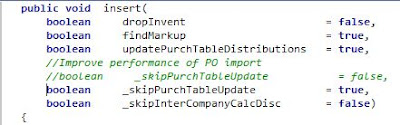
After importing the PO's, you can use a job to update the distributions by calling:
purchTable.updateFromPurchLines(true);
It's actually a very small change to make - just need to update the default value of one of the parameters on PurchLine.Insert method "_skipPurchTableUpdate" from False to True.

After importing the PO's, you can use a job to update the distributions by calling:
purchTable.updateFromPurchLines(true);
Wednesday, September 9, 2015
Query for listing duplicate Sales invoice numbers
 with InvDups as (select INVOICEID from CustInvoiceJour
 where CustInvoiceJour.DATAAREAID = 'JWC'
 group by INVOICEID having (count(INVOICEID) > 1))
 select InvDups.INVOICEID, SALESID, CREATEDDATETIME, CREATEDBY from InvDups
 join CustInvoiceJour on CustInvoiceJour.INVOICEID = InvDups.INVOICEID
 Order by InvDups.INVOICEID, CREATEDDATETIME
Tuesday, August 18, 2015
SQL Query for obtaining min and max sizes from product variants
 With Sizes_CTE (Product, DisplayOrder, Size)
 AS (
 select DISPLAYPRODUCTNUMBER Product, RETAILDISPLAYORDER DisplayOrder , NAME Size from ECORESPRODUCTMASTERDIMENSIONVALUE
 inner join ECORESSIZE on ECORESSIZE.RecId = SIZE_
 inner join ECOResProduct on EcoresProduct.RECID = SIZEPRODUCTMASTER)
 select Z.Product, Concat(max(Z.MinSize), ' - ', max(Z.MaxSize)) SizeGroup from
 (Select Product, Size MinSize, '' MaxSize from Sizes_CTE
 where Sizes_CTE.DisplayOrder = (select min(DisplayOrder) from Sizes_CTE b where b.Product = Sizes_CTE.product )
 union
 Select Product, '' MinSize, Size MaxSize from Sizes_CTE
 where Sizes_CTE.DisplayOrder = (select max(DisplayOrder) from Sizes_CTE b where b.Product = Sizes_CTE.product )) AS Z
 group by Z.Product
 order by Z.Product
Sunday, February 15, 2015
SharePoint 2013 Installation and Configuration Issues
During Installing SharePoint 2013 Prerequisites on Windows Server 2012 there was an error in installing Application Server Role , Web Server (IIS) Role : Configuration error

To resolve this error, go to windows\system32 directory.
Copy and rename servermanager.exe to servermanagercmd.exe
Monday, February 9, 2015
SQL query to extract primary address from CUSTTABLE
The following query can be used to extract the primary address from the CUSTTABLE table:
 select CUSTTABLE.ACCOUNTNUM, DIRPARTYTABLE.NAME, Address.ADDRESS
 from CUSTTABLE
 left outer join DIRPARTYTABLE ON DIRPARTYTABLE.RECID = CUSTTABLE.PARTY
 left outer join LOGISTICSLOCATION ON LOGISTICSLOCATION.RECID = DIRPARTYTABLE.PRIMARYADDRESSLOCATION
 left outer join LOGISTICSPOSTALADDRESS AS Address ON Address.LOCATION = LOGISTICSLOCATION.RECID
 Order by CUSTTABLE.ACCOUNTNUM
SQL query to extract financial dimension value from CUSTTABLE
The following SQL query can be used to extract a financial dimension value from the CUSTTABLE table:
 select CustTable.ACCOUNTNUM, SubscriberType.DISPLAYVALUE as SubscriberType
 from CustTable
 left outer join DIMENSIONATTRIBUTEVALUESETITEM AS SubscriberType ON SubscriberType.DIMENSIONATTRIBUTEVALUESET = CUSTTABLE.DEFAULTDIMENSION
 left outer join DIMENSIONATTRIBUTEVALUE ON DIMENSIONATTRIBUTEVALUE.RECID = SubscriberType.DIMENSIONATTRIBUTEVALUE
 left outer join DIMENSIONATTRIBUTE ON DIMENSIONATTRIBUTE.RECID = DIMENSIONATTRIBUTEVALUE.DIMENSIONATTRIBUTE and DIMENSIONATTRIBUTE.NAME = 'SubscriberType'
Thursday, January 15, 2015
Customer contact list for AX2012
Query to extract a quick customer contact list from Dynamcis AX 2012
 SELECT   CUSTTABLE.ACCOUNTNUM AS CUSTID, DIRPARTYTABLE.NAME AS CUSTNAME,
            CASE LOGISTICSELECTRONICADDRESS.TYPE WHEN 1 THEN 'Phone' WHEN 2 THEN 'Email' END AS CONTACTTYPE,
            LOGISTICSELECTRONICADDRESS.DESCRIPTION AS CONTACTNAME, LOGISTICSELECTRONICADDRESS.LOCATOR AS CONTACTDETAILS
 FROM     DIRPARTYTABLE AS DIRPARTYTABLE INNER JOIN
            CUSTTABLE ON DIRPARTYTABLE.RECID = CUSTTABLE.PARTY INNER JOIN
            DIRPARTYLOCATION ON DIRPARTYTABLE.RECID = DIRPARTYLOCATION.PARTY INNER JOIN
            LOGISTICSELECTRONICADDRESS ON DIRPARTYLOCATION.LOCATION = LOGISTICSELECTRONICADDRESS.LOCATION
 ORDER BY DIRPARTYTABLE.NAME
Monday, September 22, 2014
Consuming WCF web service from .NET assembly in Dynamics AX 2012
X++ code for consuming a WCF web service:
.NET Assembly
 static server str serverSendToEndPoint(str _endPoint, str _soapAction, str _serverThumbprint, str _clientThumbprint, str _xmlString)
 {
   str                 ret;
   System.String       clrEndPoint;
   System.String       clrSoapAction;
   System.String       clrServerThumbprint, clrClientThumbprint;
   System.String       clrXmlString;
   System.String       clrResponse;
   System.Exception     ex;
   Namespace.WebService webService;
   try
   {
     webService = new Namespace.WebService();
     clrEndPoint         = CLRInterop::getObjectForAnyType(_endPoint);
     clrSoapAction        = CLRInterop::getObjectForAnyType(_soapAction);
     clrServerThumbprint     = CLRInterop::getObjectForAnyType(_serverThumbprint);
     clrClientThumbprint     = CLRInterop::getObjectForAnyType(_clientThumbprint);
     clrXmlString        = CLRInterop::getObjectForAnyType(_xmlString);
     if (VendParameters::find().AVAMutualAuthentication == NoYes::Yes)
     {
       clrResponse = webService.callWCFWebService(clrEndPoint, clrSoapAction, clrServerThumbprint, clrClientThumbprint, clrXmlString);
     }
     else
     {
       clrResponse = webService.callWCFWebService(clrEndPoint, clrSoapAction, clrServerThumbprint, clrXmlString);
     }
     return CLRInterop::getAnyTypeForObject(clrResponse);
   }
   catch (Exception::CLRError)
   {
     ex = CLRInterop::getLastException();
     throw error(strFmt("The request failed with the following response %1", CLRInterop::getAnyTypeForObject(ex.ToString())));
   }
 }
.NET Assembly
namespace Namespace
{
    public class WebService
    {
      public String callWCFWebService(string url = "", string soapAction = "", string thumbPrint = "", string thumbPrint2 = "", string xmlString = "")
     {
       ServicePointManager.ServerCertificateValidationCallback = delegate(object sender, X509Certificate certificate, X509Chain chain, SslPolicyErrors sslPolicyErrors) { return true; };
       //Validate parameters
       if (url == "")
       {
         throw new System.ArgumentException("Url missing");
       }
       if (soapAction == "")
       {
         throw new System.ArgumentException("Soap Action missing");
       }
       if (thumbPrint == "")
       {
         throw new System.ArgumentException("Server Thumbprint missing");
       }
       if (thumbPrint2 == "")
       {
         throw new System.ArgumentException("Client Thumbprint missing");
       }
       if (xmlString == "")
       {
         throw new System.ArgumentException("xmlString missing");
       }
       // Create a new HttpWebRequest object for the specified resource.
       HttpWebRequest request = (HttpWebRequest)WebRequest.Create(url);
       // Request mutual authentication.
       request.AuthenticationLevel = AuthenticationLevel.MutualAuthRequired;
       // Supply client credentials.
       X509Store store = new X509Store(StoreName.My, StoreLocation.CurrentUser);
       store.Open(OpenFlags.ReadOnly | OpenFlags.IncludeArchived);
       // Find Server Certificate by thumbprint
       X509Certificate2Collection col =
       store.Certificates.Find(X509FindType.FindByThumbprint, thumbPrint.Replace(" ", ""), false);
       X509Certificate2 cert = col.OfType<X509Certificate2>().FirstOrDefault();
       if (cert == null)
       {
         throw new System.ArgumentException("Server Certificate not found in store ");
       }
       request.ClientCertificates.Add(cert);
       // Find Client Certificate by thumbprint
       col = store.Certificates.Find(X509FindType.FindByThumbprint, thumbPrint2.Replace(" ", ""), false);
       cert = col.OfType<X509Certificate2>().FirstOrDefault();
       store.Close();
       if (cert == null)
       {
         throw new System.ArgumentException("Client Certificate not found in store");
       }
       request.ClientCertificates.Add(cert);
       ASCIIEncoding encoding = new ASCIIEncoding();
       byte[] bytesToWrite = encoding.GetBytes(xmlString);
       request.Method = "POST";
       request.ContentLength = bytesToWrite.Length;
       request.Headers.Add("SOAPAction: \"" + soapAction + "\"");
       request.ContentType = "text/xml; charset=utf-8";
       request.KeepAlive = false;
       request.ProtocolVersion = HttpVersion.Version10;
       request.PreAuthenticate = true;
       //Send Request
       Stream dataStream = request.GetRequestStream();
       dataStream.Write(bytesToWrite, 0, bytesToWrite.Length);
       dataStream.Close();
       //Get Response
       string responseString = "";
       try
       {
         HttpWebResponse response = (HttpWebResponse)request.GetResponse();
         // Read and display the response.
         Stream streamResponse = response.GetResponseStream();
         StreamReader streamRead = new StreamReader(streamResponse);
         responseString = streamRead.ReadToEnd();
         //Console.WriteLine(responseString);
         // Close the stream objects.
         streamResponse.Close();
         streamRead.Close();
         //Release the HttpWebResponse.
         response.Close();
       }
       catch (Exception e)
       {
         if (e is WebException)
         {
           WebResponse errResp = ((WebException)e).Response;
           if (errResp != null)
           {
             using (Stream streamResponse = errResp.GetResponseStream())
             {
               StreamReader streamRead = new StreamReader(streamResponse);
               responseString = streamRead.ReadToEnd();
               //Console.WriteLine(responseString);
               // Close the stream objects.
               streamResponse.Close();
               streamRead.Close();
             }
           }
           else
           {
             responseString = e.Message;
             //Console.WriteLine(e.Message);
           }
         }
       }
       return responseString;
     }
}
IIS 7.0 returns HTTP "403.13 Client Certificate Revoked" error message although certificate is not revoked
I had this error today with a web service configured with client certificates on IIS.
This issue happens when Certificate Revocation List (CRL) is enabled and the IIS server doesn't have Internet access
The following Microsoft support article describes the problem http://support.microsoft.com/kb/294305
CRL can be disabled via the following registry change:
This issue happens when Certificate Revocation List (CRL) is enabled and the IIS server doesn't have Internet access
The following Microsoft support article describes the problem http://support.microsoft.com/kb/294305
CRL can be disabled via the following registry change:
HKEY_LOCAL_MACHINE\SYSTEM\CurrentControlSet\Services\HTTP\Parameters\SslBindingInfo\0.0.0.0:443]DefaultSslCertCheckMode=1
Then Reboot the server for the change to take effect
Thursday, July 24, 2014
Dynamic date ranges for queries in AX
In Dynamics AX it is possible to enter dynamic date ranges for queries e.g. currentDate, day(-1) etc. which can be useful for running a daily report via a scheduled batch job.
The following example uses day(-1) to select Customer tax invoice journal records for yesterday
 There are a number of dynamic data query values available in AX 2012, which can be found in the SysQueryRangeUtil class

The following example uses day(-1) to select Customer tax invoice journal records for yesterday
Wednesday, July 23, 2014
How to calculate time consumed running a process in X++
This code can be used to calculate the time consumed running a process
 static void Job21(Args _args)
 {
   int startTime = timeNow();
   int endTime;
   sleep(5000);
   endTime = timeNow();
   info(strFmt("Process took %1", timeConsumed(startTime, endTime)));
 }
Setting LedgerDimension field on LedgerJournalTrans table in AX 2012 via X++ code
The following code can be used to update LedgerDimension field on the LedgerJournalTrans
 RecId getDimension(str _ledgerAccount, str _businessUnit, str _costCentre, str _jurisdiction, str _subscriberType)
 {
   DimensionServiceProvider      DimensionServiceProvider = new DimensionServiceProvider();
   LedgerAccountContract        LedgerAccountContract = new LedgerAccountContract();
   DimensionAttributeValueContract   ValueContract;
   List                ListValueContract = new List(Types::Class);
   dimensionAttributeValueCombination dimensionAttributeValueCombination;
   DimensionStorage          dimStorage;
   if (_businessUnit)
   {
     ValueContract = new DimensionAttributeValueContract();
     ValueContract.parmName('BusinessUnit') ;
     ValueContract.parmValue(_businessUnit);
     ListValueContract.addEnd(ValueContract);
   }
   if (_costCentre)
   {
     ValueContract = new DimensionAttributeValueContract();
     ValueContract.parmName('CostCentre') ;
     ValueContract.parmValue(_costCentre);
     ListValueContract.addEnd(ValueContract);
   }
   if (_jurisdiction)
   {
     ValueContract = new DimensionAttributeValueContract();
     ValueContract.parmName('Jurisdiction') ;
     ValueContract.parmValue(_jurisdiction);
   }
   if (_subscriberType)
   {
     ValueContract = new DimensionAttributeValueContract();
     ValueContract.parmName('SubscriberType') ;
     ValueContract.parmValue(_subscriberType);
     ListValueContract.addEnd(ValueContract);
   }
   LedgerAccountContract.parmMainAccount(_ledgerAccount);
   LedgerAccountContract.parmValues(ListValueContract);
   dimStorage = DimensionServiceProvider::buildDimensionStorageForLedgerAccount(LedgerAccountContract);
   dimensionAttributeValueCombination = DimensionAttributeValueCombination::find(dimStorage.save());
   return dimensionAttributeValueCombination.RecId;
 }
Setting Default Dimension using code in AX 2012
The following method can be used to set the default dimension e.g. on CustTable when importing data via X++
 static DimensionDefault findDefaultDimension(str _businessUnit, str _costCentre, str _jurisdiction, str _subscriberType)
 {
   Struct             struct = new Struct();
   container            defDimensionCon;
   DimensionDefault        dimensionDefault;
   DimensionAttributeSetItem    dimAttrSetItem;
   DimensionAttribute       dimAttribute;
   int i;
   //Read required dimensions
   while select Name, BackingEntityType from dimAttribute
     where dimAttribute.BackingEntityType == tableNum(DimensionFinancialTag) &&
        dimAttribute.Type       != DimensionAttributeType::DynamicAccount
        join dimAttrSetItem
         where dimAttrSetItem.DimensionAttribute == dimAttribute.RecId &&
            dimAttrSetItem.DimensionAttributeSet == DimensionCache::getDimensionAttributeSetForLedger()
   {
     //Add the Dimension name and value to struct
     if (_businessUnit && dimAttribute.BackingEntityType == tableNum(DimensionFinancialTag) && dimAttribute.Name == 'BusinessUnit')
     {
       struct.add(dimAttribute.Name, _businessUnit);
     }
     if (_costCentre && dimAttribute.BackingEntityType == tableNum(DimensionFinancialTag) && dimAttribute.Name == 'CostCentre')
     {
       struct.add(dimAttribute.Name, _costCentre);
     }
     if (_jurisdiction && dimAttribute.BackingEntityType == tableNum(DimensionFinancialTag) && dimAttribute.Name == 'Jurisdiction')
     {
       struct.add(dimAttribute.Name, _jurisdiction);
     }
     if (_subscriberType && dimAttribute.BackingEntityType == tableNum(DimensionFinancialTag) && dimAttribute.Name == 'SubscriberType')
     {
       struct.add(dimAttribute.Name, _subscriberType);
     }
   }
   defDimensionCon += struct.fields();
   for (i = 1; i <= struct.fields(); i++)
   {
     defDimensionCon += struct.fieldName(i);
     defDimensionCon += struct.valueIndex(i);
   }
   if (struct.fields())
   {
     //Get the DimensionAttributeValueSet RecId
     dimensionDefault = AxdDimensionUtil::getDimensionAttributeValueSetId(defDimensionCon);
   }
   return dimensionDefault;
 }
Tuesday, June 24, 2014
Workflow Stopped (error): X++ Exception: Work item could not be created. Insufficient rights for user ?
I've had this problem a number of times and the error message doesn't give you enough information to know exactly what permissions need to be added for the user.
There are a couple of ways to determine the menu items and web menu items associated with the workflow.
The first way is to go to the AOT and look under the Workflow > Approvals node
The required display menu and web display menu items are highlighted below

The required action and web action menus are highlighted below

Check that the user has permission to access these display and action menu and webmenu items.
You can also use the Visual Studio 2010 debugger on the SysWorkflowDocument.assertAsUser() class method to locate the menu item(s) that the user doesn't have access to.

There are a couple of ways to determine the menu items and web menu items associated with the workflow.
The first way is to go to the AOT and look under the Workflow > Approvals node
The required display menu and web display menu items are highlighted below
The required action and web action menus are highlighted below
Check that the user has permission to access these display and action menu and webmenu items.
You can also use the Visual Studio 2010 debugger on the SysWorkflowDocument.assertAsUser() class method to locate the menu item(s) that the user doesn't have access to.
“SysDictEnum object not initialised” error running AIF document service creation wizard
Came across an issue with creating a new AIF document
service today. The error reported in the InfoLog was “SysDictEnum object not
initialised”, which gave me an indication of a problem with an Enum.
The stack trace occurred during the creation of one of the
document classes and by looking at the partially created class I was able to
determine the database field that was causing the problem.
A quick check of the EDT properties revealed the problem - the Enum that I had created and added to my table didn’t have an EnumType.
After correcting the Enum I was able to rerun the AIF create document service
wizard successfully this time.Wednesday, November 6, 2013
Display required license on Secuirty privileges form in AX2012
To assist with creating security roles for lower license levels (Functional, Self-serve, etc) I made a small mod to the Security prviledges form to display the license level required for each permission object. Easier than having to generate and run the license report everytime you make a change or having to lookup each permission in the AOT to see the license level.

These fields can be added by creating two new display methods on the securableObject data source on the SysSecTasksEditPS form:
The above code adds a display method to display the ViewUserAccessLincense. The other display method is exactly the same except #PropertyFullUserLicense is used instead of #PropertyReadUserLicense on the following line:
userLicType = typeSet.lookup(treeNode.AOTgetProperty(#PropertyReadUserLicense));
Then all you need to do is add the display methods to the grid in the form design and you're done

These fields can be added by creating two new display methods on the securableObject data source on the SysSecTasksEditPS form:
 public display UserLicenseType displayViewUserAccessLicense(SecurableObject _object)
 {
   #AOT
   #Properties
   #define.PropertyReadUserLicense('ViewUserLicense')
   #define.PropertyFullAccessUserLicense('MaintainUserLicense')
   UserLicenseType userLicType;
   TreeNode    treeNode;
   EntryPointType type = Global::enum2int(_object.Type);
   str       nodePath =
             (type == EntryPointType::MenuItemDisplay) ? strFmt('%1\\%2', #MenuItemsDisplayPath, _object.Name) :
             (type == EntryPointType::MenuItemOutput) ? strFmt('%1\\%2', #MenuItemsOutputPath, _object.Name) :
             (type == EntryPointType::MenuItemAction) ? strFmt('%1\\%2', #MenuItemsActionPath, _object.Name) :
             (type == EntryPointType::WebUrlItem) ? strFmt('%1\\%2', #WebMenuItemsUrlPath, _object.Name) :
             (type == EntryPointType::WebActionItem) ? strFmt('%1\\%2', #WebMenuItemsActionPath, _object.Name) :
             (type == EntryPointType::WebManagedContent) ? strFmt('%1\\%2', #WebContentItemsManagedPath, _object.Name) :
             '';
   Map typeSet = new Map(Types::String, Types::Enum);
   // Available types property values
   typeSet.insert('', UserLicenseType::None);
   typeSet.insert('None', UserLicenseType::None);
   typeSet.insert('SelfServe', UserLicenseType::SelfServe);
   typeSet.insert('Task', UserLicenseType::Task);
   typeSet.insert('Functional', UserLicenseType::Functional);
   typeSet.insert('Enterprise', UserLicenseType::Enterprise);
   typeSet.insert('Server', UserLicenseType::Server);
   if (nodePath != '')
   {
     treeNode = TreeNode::findNode(nodePath);
   }
   if (treeNode)
   {
     userLicType = typeSet.lookup(treeNode.AOTgetProperty(#PropertyReadUserLicense));
     treeNode.treeNodeRelease();
   }
   return userLicType;
 }
The above code adds a display method to display the ViewUserAccessLincense. The other display method is exactly the same except #PropertyFullUserLicense is used instead of #PropertyReadUserLicense on the following line:
userLicType = typeSet.lookup(treeNode.AOTgetProperty(#PropertyReadUserLicense));
Then all you need to do is add the display methods to the grid in the form design and you're done
Subscribe to:
Posts (Atom)